
Automatic categorization: how an app sorts your spending

Co-founder of Penge · Updated 21 August 2026 · 6 min read
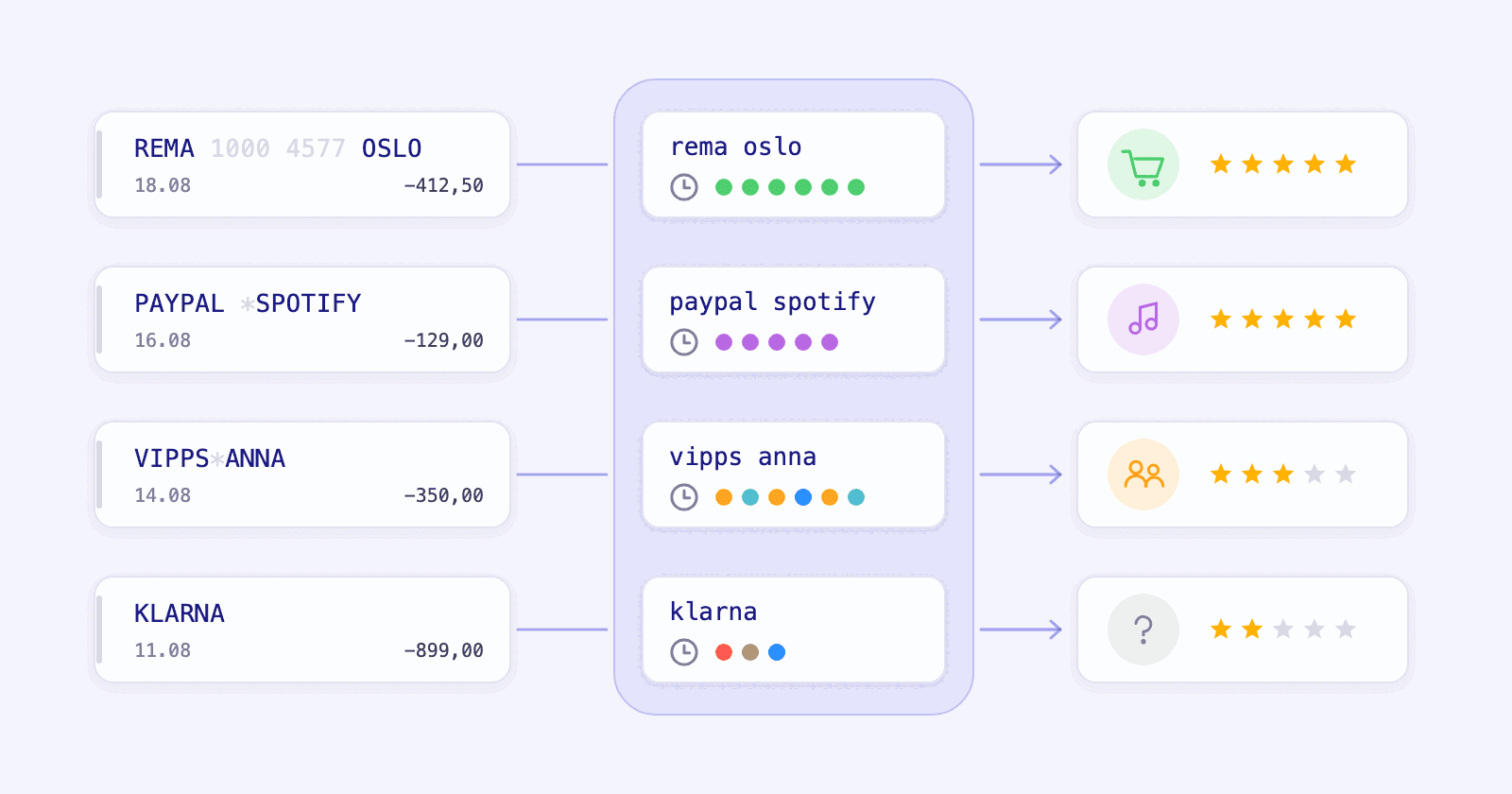
Before a budgeting app can tell you anything, it has to turn a line of bank text into something you recognize. That step is harder than it looks, and it decides how much work the app hands back to you.
Key takeaways
- Over Open Banking your bank sends a date, an amount and one line of text. That line is written by the payment terminal or the payment provider, not by the shop.
- So a grocery run arrives as REMA 1000 4577, and a Vipps transfer arrives with nothing but a first name.
- Penge cleans that text, compares it with your categorized history and suggests a category for you to confirm.
- A saved rule categorizes matching future transactions automatically. Separately, if you turn on automatic categorization in settings, Penge applies only its most confident suggestions and never overwrites a category you set.
- Transfers between people, cash withdrawals and Klarna invoices may lack enough detail, so check the suggestion before you confirm it.
What does automatic categorization actually mean?
Automatic categorization means Penge fills in its most confident category suggestions itself, without waiting for your confirmation, and it stays off until you turn it on in settings. A plain suggestion uses your categorized history and waits for you to confirm it, a saved rule applies to matching future transactions, and the automatic setting never replaces a category you chose.
Each suggestion carries a confidence score of up to five stars. A rule fits descriptions you already recognize, like your gym. The automatic setting covers the rest: it applies only 5-star suggestions and leaves everything less certain for you.
What your bank actually sends
A transaction over Open Banking is a short record: the date, the amount, the currency, which account it hit and one line of free text. There is an optional field for the payee's name, but banks rarely fill it in for card payments, and nothing says what you bought. That line is written by whoever moved the money, and that is seldom the shop.
- Card payments carry the text from the payment terminal, often with a till number in it, so one shop turns up under several spellings.
- Vipps, Swish and MobilePay give you the service name and sometimes a first name, which says nothing about what the money was for.
- Klarna, PayPal and Stripe show up under their own names, because they are the ones that took the payment.
- Purchases abroad come through converted, and the text is often cut short to fit a field designed decades ago.
| The description says | It is really | Because |
|---|---|---|
| REMA 1000 4577 OSLO | A grocery run | The number identifies the till, not the shop |
| VIPPS*ANNA | Money to a friend | Vipps sends the name, never the reason |
| SWISH BETALNING | Anything at all | Many Swish transfers carry no payee |
| MOBILEPAY | A haircut, or half of last night's dinner | MobilePay is the channel, not the payee |
| KLARNA | Something you bought weeks ago | Klarna bills long after the shop delivered |
| PAYPAL *SPOTIFY | A subscription | PayPal passes the merchant through, shortened |
How Penge reads it
Penge is our own app, so read this as a description of our own workings rather than a review. The steps are the ones any app has to take.
- Clean the text. Lowercase it and drop the digits and punctuation, and REMA 1000 4577 OSLO and REMA 1000 8812 OSLO both become rema oslo.
- Look up how that cleaned description has been categorized before. A consistent pattern in your own history gives the suggestion a stronger score.
- Score how certain the match is. By default, even the top suggestion waits for you to confirm it. Turn on automatic categorization in settings and Penge can apply only a 5-star suggestion.
- Use the result next time. Your confirmed category joins the history behind later suggestions. If the description should always get that category, save a rule for it.
Two safeguards matter more than the hit rate. Penge never changes a category you set yourself, and it never fills in a transfer between your own accounts on its own, because moving your money around is not spending.
The transactions that still need your context
Some transactions do not carry enough information to choose confidently. A suggestion or rule can match the description, but only you know what the payment was for.
- A Vipps or Swish transfer to a person could be rent, a birthday present or your share of a taxi.
- A cash withdrawal tells you an amount left the account, and nothing else.
- A Klarna invoice lands weeks after the purchase, under Klarna's name.
- A shop that sells several things at once, like a grocery store with a flower stand, ends up in one category unless you split the transaction.
Penge lets you split a transaction across categories for the last case. For the first two, a short note is usually all you need to remember what happened.
The half hour that makes later reviews shorter
- Open the last full month and work down the list. Many lines can have a category suggestion ready to confirm.
- Confirm the useful suggestions and correct the others. Both add to your categorized history. Save a rule when the same description should always get one category.
- Split the lines that were two purchases in one.
- Leave the transfers between people for last and place them from memory, with a note where you will want one later.
After that first pass, repeated descriptions give the suggestion engine more of your categorized history. Saved rules run automatically. If you opt in, automatic categorization also applies the 5-star suggestions, while anything less certain stays ready for your review.
Does it get more accurate over time?
Yes. Confirmed and corrected categories become part of your categorized history, so repeated descriptions can earn stronger suggestions. That does not make a suggestion into a rule: a saved rule applies to matching future transactions automatically. Without a rule, you still confirm suggestions unless you have turned on automatic categorization in settings.
Wondering whether Penge reaches your bank at all? See the banks we support
Get a full overview with Penge
Connect your bank and let the app categorize and budget automatically.
Frequently asked questions
- Can I make my own categories?
- Yes. You can add categories, rename the ones that come with the app and set a budget per category, so the budget follows the categories you actually use rather than ours.
- What happens when the app gets it wrong?
- Move the transaction to the right category. That result joins the history used for later suggestions, but it does not guarantee the next match will be categorized. Save a rule if that description should always use the category. You can change the category again later.
- Does it suggest categories for older transactions too?
- Yes, for every transaction the app has, but bank sync does not reach far back: the first connection fetches the current month, plus the previous one if you connect in the first half of a month. Older history has to come in as a file import, and the same suggestions run on those rows too.
- Do I have to connect a bank for this to work?
- No. You can import a statement as a file instead, and the same categorization runs on it. Connecting the bank only saves you from doing the import every month.