
Getting started
Set up Penge and connect your first bank
Penge starts with an account and one bank. This is the welcome screen, the questions about how you spend, signing in, and the bank login that brings your transactions in.
How do you set up Penge?
Tap Let's get started! on the welcome screen, answer the category questions or skip them, then turn on the consent toggle and sign in with Apple, Google or email. Penge then asks for your bank, opens the bank's own login, and lands you on the tab bar once the first transactions arrive.
Create your account
- Open Penge and tap Let's get started! If you have used Penge before, tap I already have an account instead.
- On the next screen, tap Personalize my categories, or No thanks, I'll do it manually to skip the questions.
- Answer one question at a time and tap Continue. Skip question leaves a question out and clears anything you had picked on it.
- Turn on the toggle that says you consent to the privacy policy and terms of service. Nothing below it works until you do.
- Choose the Apple button, Sign up with Google, or the Sign up with email link.
- For email, type your address and tap Send sign-in link. Then either tap the link in the email on this phone, or type the six-digit code from it into the app.
Connect your first bank
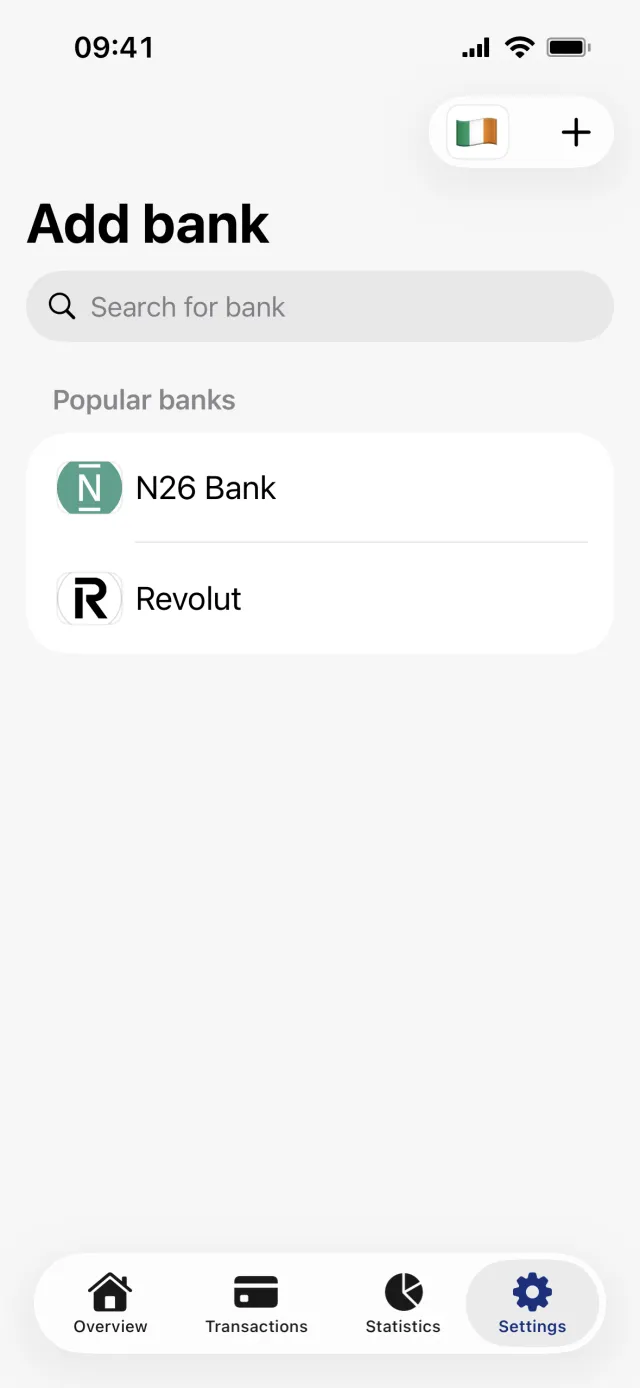
- Penge shows Add your bank as soon as you are signed in. Look under Popular banks and Other banks, or search.
- Tap the flag button in the top right to switch country if your bank is not in the one shown.
- Tap your bank, then tap Connect to your bank.
- Log in on your bank's own page in the sheet that opens. Its header says Read-only access.
- Wait for Connecting to your bank to finish. Penge opens on the tab bar with your accounts and first transactions in place.
Good to know
- The questions decide one thing: which categories and category groups your account starts with. Nothing else in the app reads the answers, and you can add, edit or delete categories at any time.
- Skipping the questions does not give you a smaller set. It gives you the full default list.
- There is no way to look around without an account, and no way past the bank screen except connecting a bank or creating a manual account.
- Going back from a bank's screen to the list deletes the bank you just created, on the phone and on the server. Try the connection again rather than reaching for back.
- The first sync is not a full archive. Penge asks the bank for the current month, plus the month before it when you connect in the first half of a month. The 90 days you approve is how long the access lasts, not how much history you get.
Which sign-in method should you pick?
All three land in the same account, and there is no password anywhere in Penge. Sign in with Apple asks for your email address and nothing else. The emailed link only works on the phone that asked for it, so if you opened the mail on a computer, type the six-digit code into the app instead. Send a new link if nothing arrives.
The bank login happens on your bank's own page and the access is read-only. There is more on the permission itself in is Open Banking safe.
Check that your bank is in the catalogue before you start. Search the bank list
If it is not there, a manual bank and an imported statement get you to the same place.
Get a full overview with Penge
Connect your bank and let the app categorize and budget automatically.
Questions about this
- Do I have to answer the questions about how I spend?
- No. No thanks, I'll do it manually goes straight to the sign-up buttons, and your account is created with every default category rather than a filtered set.
- Can I use Penge without connecting a bank?
- Yes. Create a manual account instead, then add transactions yourself or import a statement. What you cannot do is get past that screen without one of the two.
- Does Penge see my bank password?
- No. You log in on your bank's own page. The connection gives read-only access to account details, balances and transactions, and Penge has no payment flow at all.
- Why does the progress bar jump forward?
- The questions count out of ten, but several only appear if an earlier answer applies to you. Each question that is passed over takes its step of the bar with it, so the bar moves in uneven jumps. It does fill, on the last question, which everyone gets.