
Widgets, privacy and your account
Privacy controls: amounts and AI suggestions
Three settings decide what other people can read off your screen and what leaves your phone. All three sit under Preferences, and the two that involve AI are off until you turn them on.
What leaves your phone, and what does not
Nothing goes to an outside company unless you switch on Use AI for better suggestions, which is off for every new account. Automatic categorization runs on Penge's own model over your own history. Hide amounts is a display mask and sends nothing anywhere.
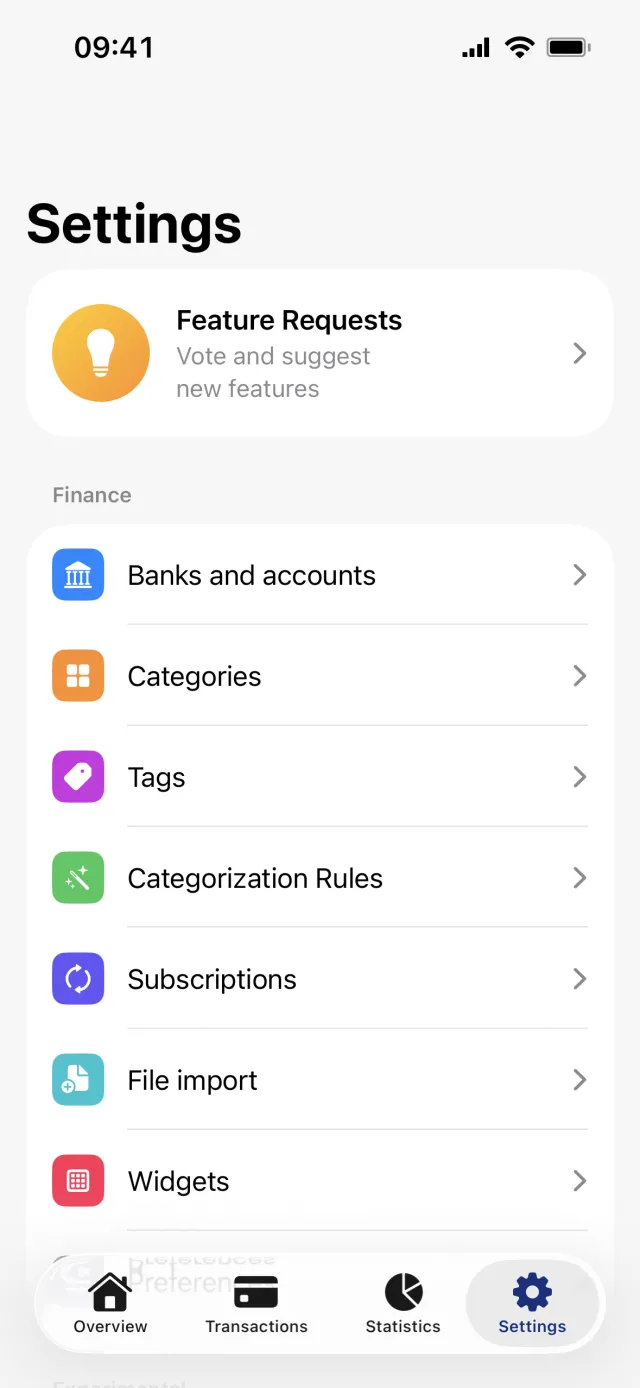
Hide every amount
- Open the Settings tab and tap Preferences under Finance.
- In the section headed Display, turn on Hide amounts.
- The same toggle also sits under Settings and Widgets, in a section headed Privacy, and as a Hide amounts control in Control Center.
- The Widgets page is where the app spells out the reach: masks every amount, both in the app and in your widgets, so nothing is readable from your Home Screen.
Good to know
- It is one setting in three places, not three separate options.
- It is masking, not a lock. Penge has no Face ID, no Touch ID and no passcode, so hiding amounts does not stop anyone opening the app. There is more on how the data is held on the security page.
- It is stored on the phone, so it does not follow your account to another device.
- It masks what Siri reads out too, though the number a shortcut receives stays exact.
The two categorization settings
Automatically categorize confident transactions, under the heading Automatic categorization, lets Penge file the transactions it is most sure about. It learns from your own history and shares nothing outside the app. It is off for a new account, and turning it on from Settings first shows you the backlog it is about to categorize.
AI suggestions are off until you say yes
- In Preferences, scroll to the last section, headed AI suggestions.
- Turn on Use AI for better suggestions. A sheet opens, headed Get smarter suggestions with AI?
- Read What's shared: the transaction's text and amount, your category names, and a few similar transactions you have already categorized.
- Read Who it's shared with: OpenAI or Google Gemini, only while suggestions are generated.
- Tap Enable AI suggestions to agree, or Not now to leave it off.
Good to know
- Only the button in the sheet records consent. The toggle looks on while the sheet is open, and dismissing it puts the toggle back.
- The app warns that transaction text can include names, for example who you paid with Vipps. Nothing is sent while the setting is off.
- The same sheet can appear on its own on the Transactions tab once you have five or more uncategorized transactions. Closing it leaves the setting off.
- Turning it back off is immediate and silent, with no confirmation, and it is stored on your account rather than the phone.
Get a full overview with Penge
Connect your bank and let the app categorize and budget automatically.
Questions about this
- Can I lock Penge with Face ID?
- No. There is no app lock, no Face ID, no Touch ID and no passcode anywhere in Penge. Hide amounts is the app's answer to someone reading over your shoulder, and it masks the figures rather than blocking the app.
- What is the difference between the two AI settings?
- Automatic categorization files high-confidence transactions using Penge's own model over your history, and nothing leaves the app. Use AI for better suggestions sends transaction text and amounts to OpenAI or Google Gemini while a suggestion is generated. They are separate switches.
- Do I lose my old suggestions if I turn AI off?
- No. Categories you have already given a transaction stay exactly as they are, and Penge keeps suggesting from your own history. Turning the setting off only stops new transaction text being sent out for a suggestion.