
Transactions
Edit a transaction: what you can change
Bank text is rarely the name you would have given a payment. On the transaction screen you can rewrite it, correct the amount, move the date and add a note, a category and tags. Two of those edits overwrite something, so it is worth knowing which.
How do you edit a transaction?
Tap a row in the list to open the Transaction screen. Description, Amount, Date, Note, Category and Tags are all editable there. Nothing has a save button: the text fields commit a moment after you stop typing, and everything else saves the instant you pick it.
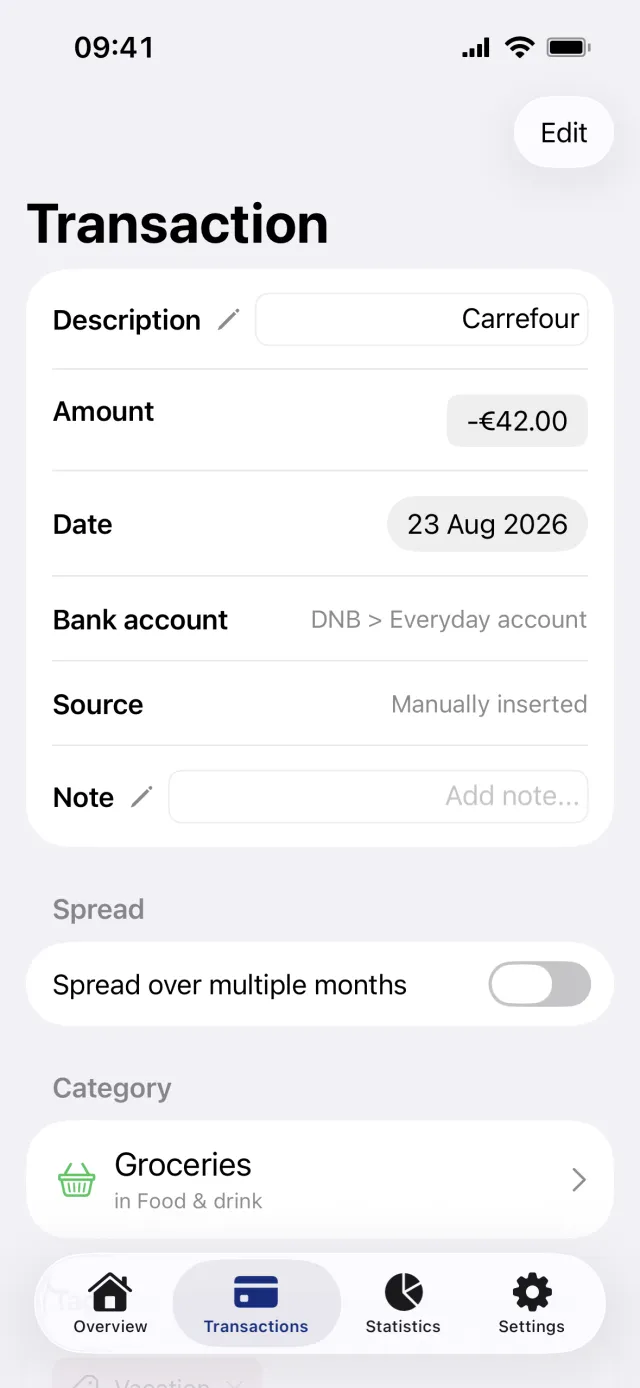
Change the description, amount and date
- Open the Transactions tab and tap the transaction.
- Tap the field next to Description and type the name you want. It saves about a second and a half after you stop typing.
- Tap the figure next to Amount. The sheet Edit Amount opens with the number pad up. Use the plus and minus key above the keyboard to switch between an expense and money in, then tap Save.
- Tap the date next to Date and pick a day in the calendar. It closes and saves at once.
Add a note, a category and tags
- Tap the field next to Note and write. A note saves about three seconds after you stop typing. The field grows to five lines, and pressing return closes the keyboard instead of starting a new line.
- In the Category section, tap the category card. Select category opens, and picking one brings you back.
- In the Tags section, tap Add tag and choose one in Select Tag.
- To take a tag off, tap its chip in the Tags section. It comes off straight away, with no confirmation and no undo.
Good to know
- Renaming replaces the bank's own text. Penge does not keep the original wording alongside it, and there is no way back to it.
- The date works differently. Penge keeps the bank's date in the background and shows yours instead, and there is no reset button for either field.
- A transaction you have given a note or your own date is no longer matched automatically as a transfer between your own accounts.
- Every edit here needs a connection. Offline the controls are greyed out, nothing is queued and no message says so.
- You cannot move a transaction to another account. The Bank account row is text, not a picker.
- Reserved transactions have none of this. They open a read-only screen with no Edit button, no category and no tags.
Faster routes from the list
You do not have to open a transaction to categorize or tag it. Swipe a row to the right to reveal Add category together with up to two suggested categories, and tapping a suggestion applies it at once. Swipe the row to the left for Add tag. A row that has no category yet reads Not categorized, which is a label rather than a category.
Remove a transaction
Tap Edit in the top right, then Delete transaction, and confirm in Delete transaction?. The row disappears from Penge and the next sync does not bring it back. Nothing changes at your bank. A transaction that belongs to a split cannot be removed at all until you undo the split first.
Get a full overview with Penge
Connect your bank and let the app categorize and budget automatically.
Questions about this
- Is there a save button anywhere on this screen?
- No. Description and Note save themselves a short pause after you stop typing, and the date, the category and the tags save the moment you choose them. The only Save button is inside the Edit Amount sheet.
- Can I get the bank's original description back?
- No. Renaming overwrites it, so write the new name with that in mind. The date is the exception: the bank's date is still stored, but the app shows yours and offers no way to switch back.
- Why is everything greyed out?
- You are offline. Editing a transaction goes straight to the server, so the controls stay disabled until the connection is back. Nothing you typed while offline is queued.
- Does deleting a transaction change anything at my bank?
- No. Penge only reads from your bank, so the row disappears in Penge alone. Your bank statement is untouched.