
Transactions
Spread a cost over several months
A yearly insurance premium in one month makes that month look terrible and the other eleven look better than they were. Spreading divides the amount evenly across a run of months in your statistics, without touching the payment itself.
What does spreading a cost do?
It divides one transaction evenly across a range of months in your statistics. Your balance and the transaction list are untouched: the full amount stays on the day you paid it. It is one toggle on the transaction, called Spread over multiple months.
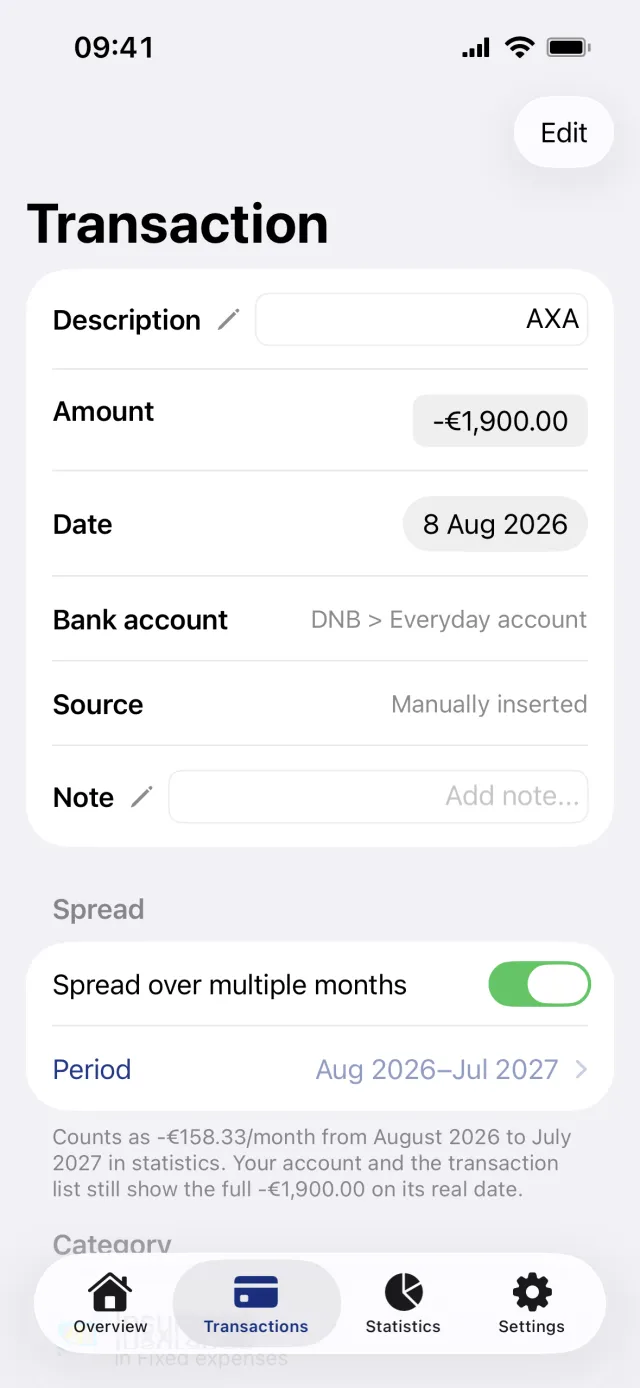
Turn spreading on
- Open the Transactions tab and tap the transaction.
- Find the section headed Spread.
- Turn on Spread over multiple months. It applies at once, with a default of twelve months starting in the month of the transaction.
- Read the sentence under the toggle. It states the monthly figure and reminds you that your account and the list still show the full amount on its real date.
- To stop, turn the toggle off. The whole amount counts in its own month again.
Choose which months it covers
- Tap the Period row under the toggle.
- Pick a Mode: Starting this month, Ending this month, Yearly or Custom.
- For Starting this month and Ending this month, set the number of months with the Spread over stepper. The range runs from the transaction's own month, and From and To show the result.
- For Yearly, pick a Year. The range is January to December of it.
- For Custom, set From and To yourself.
- Check the Per month row, then tap Done.
Good to know
- Spreading changes your statistics. It does not change a budget: the whole amount still counts against the budget for the month the transaction is dated. It is also left out of the day-by-day spending curve.
- Months that have not arrived yet get nothing. Spreading forward twelve months shows a share only up to the current month.
- The share is the amount divided by the number of months, evenly. It is not weighted by the length of a month.
- The range takes effect when the sheet closes, not when you tap Done. Swiping the sheet down applies it too.
- Penge stores the two months, not the mode. A range running January to December of one year always reopens as Yearly.
- With Custom you can pick a range that leaves out the month you paid in. That month then gets nothing from the transaction at all.
- The stepper starts at two months and stops at 120. Custom covers the transaction's own month give or take 24 months.
- Reserved transactions have no Spread section.
What a spread transaction looks like in the list
When the list covers exactly one month or one whole year, the months inside the range where you did not actually pay get a dimmed row under a heading Spread into, followed by the month or year. It shows that month's share and the real date, not the full amount. The real transaction carries a small Spread over line naming the number of months, and still shows the whole amount.
Get a full overview with Penge
Connect your bank and let the app categorize and budget automatically.
Questions about this
- Does spreading help a budget that one big bill blew?
- No. Budgets count the full amount in the month the transaction is dated, whatever the spread says. Spreading is a statistics tool, not a budgeting one.
- Can I spread income as well?
- Yes. The toggle does not care about the sign, so a bonus or a tax refund can be spread the same way as a bill.
- Why do the coming months show nothing?
- Penge never projects a spread into the future. The range stops at the current month, so the later months fill in as they arrive.
- Can I spread one part of a split transaction?
- You can, but saving the split again copies the first part's range onto every part. [Split a transaction](/help/split-a-transaction) covers the editor.