
Transactions
How to find a transaction in Penge
A few thousand rows in, scrolling stops working. Penge gives you a search field over descriptions, notes and amounts, and a row of filter chips that the Statistics tab shares.
How do you find a transaction?
Open the Transactions tab and tap the search field to look through descriptions, notes and amounts. For anything else use the chips above the list: In/out, Category, Date, Tag, Bank Account and File. Search and chips work together, so you can search one word inside one month.
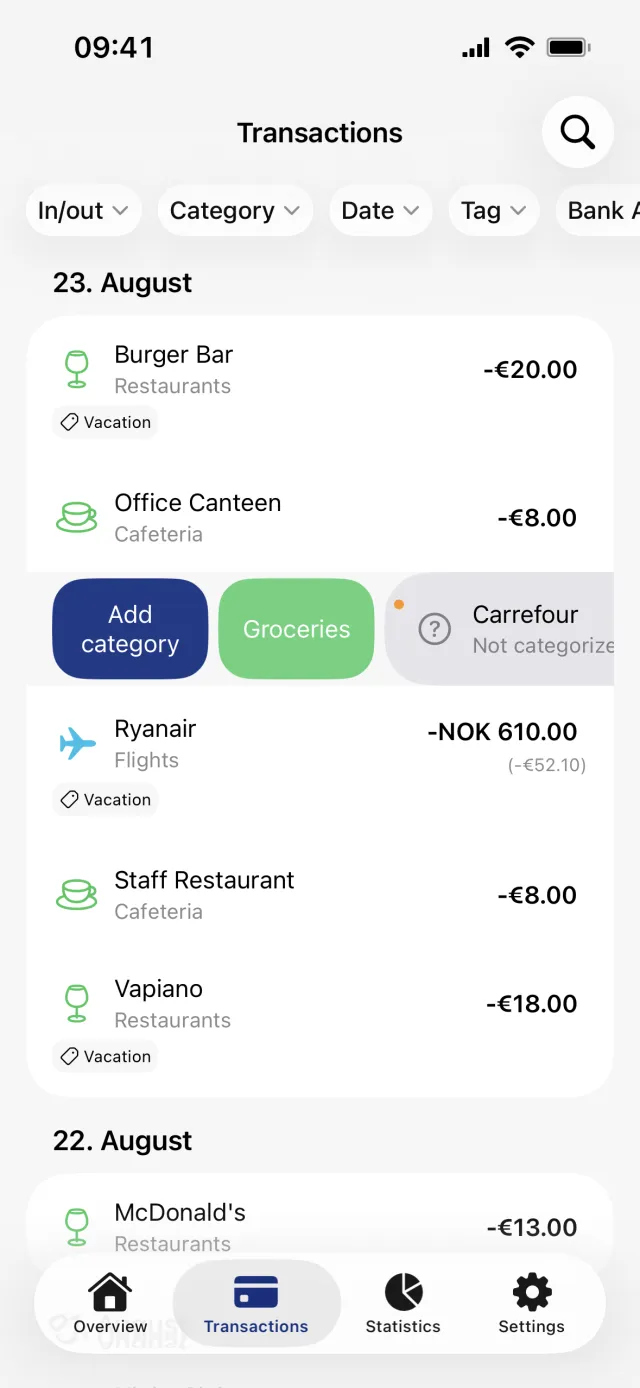
Search by description, note or amount
- Open the Transactions tab in the bottom tab bar.
- Tap the search field at the top of the screen. It reads Search transactions...
- Type a merchant name, a word from a note, or an amount. The list narrows as you type and stays grouped by day.
- Clear the field to get the whole list back. When nothing matches, Penge shows No results for and repeats what you typed.
Good to know
- Search reads the description, the note and the amount. Category names, tag names, account names and file names are not searched. The chips cover those.
- An amount matches both signs. Typing 100 finds money in of 100 and a payment of 100, anywhere from 100.00 to 100.99. Add decimals for an exact figure, with either a comma or a full stop.
- Search looks at what is already in Penge. It does not ask your bank for older months.
Narrow the list with the filter chips
The chips above the list are In/out, Category, Date, Tag, Bank Account and File. An active chip turns coloured, and when you have picked exactly one thing it shows that name. Once any chip is on, a funnel chip appears at the far left with the number of kinds of filter you have set. Tap it for Clear all filters.
- In/out is one setting with three states. Money in shows what came in, Money out shows what went out, and tapping the option that is already on switches it off again.
- Category, Tag, Bank Account and File open a picker where you can tick several. Inside one chip the choices count as any of them. Across chips a transaction has to match every chip you have set.
- Tag has an Include and an Exclude side. Include shows transactions carrying any of the chosen tags, Exclude hides them, and a tag used on one side cannot be picked on the other.
- Date opens Filter by Date with a Start Date, an End Date and an Apply button. Both days count. Clear Date Filter removes the range again.
Good to know
- The chips are the same setting as on the Statistics tab. Filtering here changes what Statistics shows, and clearing it in one place clears it in both.
- Filters are not remembered. They survive switching tabs, but they are gone the next time you open the app.
- There are no presets such as This month. The two date pickers open on the last 30 days, but nothing is filtered until you tap Apply.
- Clear all filters leaves the search field alone.
Why the list is in the order it is
Newest date first, and within one day the most recently added first. There is no sort control anywhere, so no oldest first and no sorting by amount. Rows sit under a heading for each day, and Penge loads about fifty at a time, fetching the next batch as you near the bottom. Pull down from the top of the list to sync new transactions from your banks.
Get a full overview with Penge
Connect your bank and let the app categorize and budget automatically.
Questions about this
- Can I search for a category or a tag name?
- No. The search field reads descriptions, notes and amounts only. Use the Category chip or the Tag chip instead, which also lets you combine a tag with a date range.
- Where did my filters go?
- They live in memory while the app is running. Switching tabs keeps them, closing the app clears them. Nothing you filtered is lost, only the filter itself.
- Why does Money out hide my transfers?
- A transfer between two of your own accounts is merged into one row that is neither money in nor money out, so the filter leaves it out. [Transfers, duplicates and reserved rows](/help/transfers-duplicates-and-reserved) explains the row.
- Can I sort by amount?
- No. The order is fixed to newest first. To see where the money went instead, set a category or a date range and read the statistics for that period.