
Banks and accounts
Manual accounts and manual balances
Some accounts never arrive through a bank connection: a credit card the bank does not expose, a bank outside the catalogue, cash you want to keep an eye on. A manual account gives them a place, and a manual balance gives them a number.
How do you create a manual account?
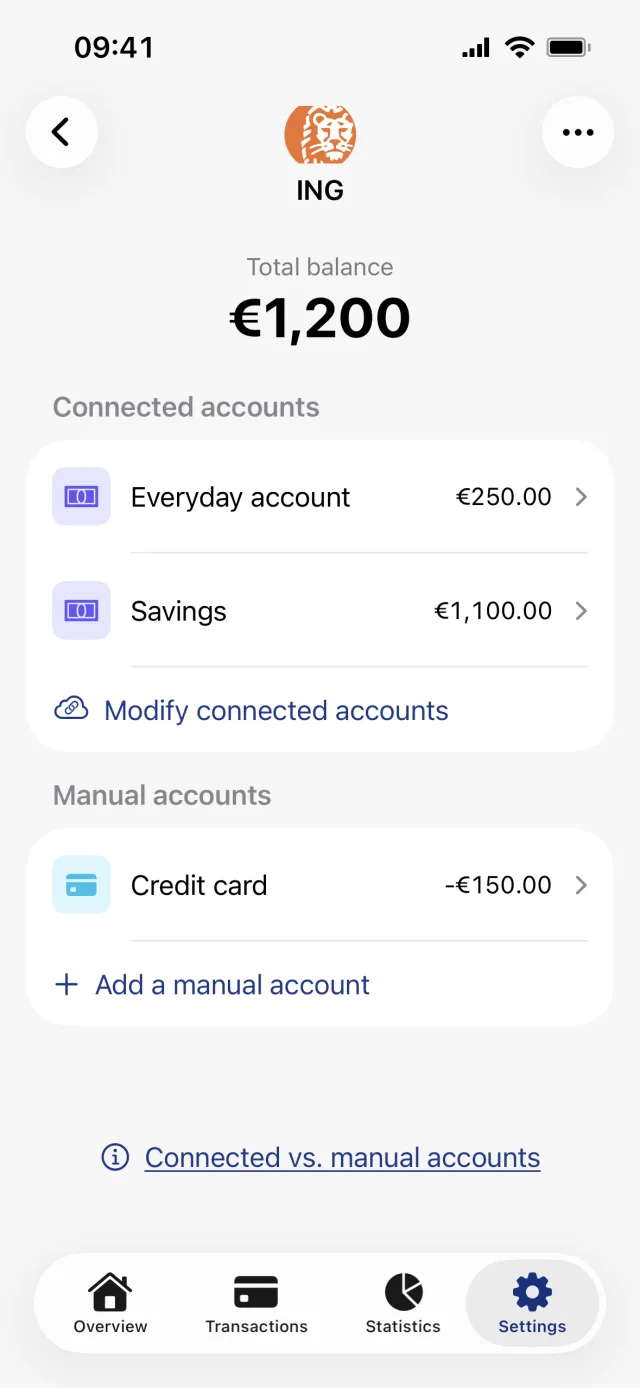
Open Settings, tap Banks and accounts, tap the bank it belongs to, then tap Add a manual account under Manual accounts. Give it a name, pick Debit card or Credit card, optionally type the balance you have right now, and tap Save. The name is the only required field.
Create the account
- Open the Settings tab and tap Banks and accounts.
- Tap the bank the account belongs to. If that bank is not in your list, tap Add another bank, then the plus in the top right to add it by name under Add manual bank.
- Scroll to Manual accounts and tap Add a manual account.
- Type a name under Account name.
- Pick Debit card or Credit card under Account Type.
- Optionally type today's balance under Balance. The plus-minus key above the keyboard flips the sign.
- Tap Save.
Set, adjust or remove the balance
- Open the account. With no balance yet, tap Set balance.
- Type what the account holds right now and tap Save.
- From then on the figure sits in a row called Balance. Tap it to open Adjust balance and correct it.
- Remove balance, further down that sheet, clears the figure and takes the account out of your totals.
How the balance carries forward
The number you save is an anchor, not a live figure. Penge stores the amount and the moment you saved it, then adds every transaction on that account that comes after that moment. What you see is that sum, and saving again re-anchors it at the new moment.
So a transaction you enter today but date to last week does not move the balance. Reserved transactions are skipped as well. When a figure has drifted, the quickest fix is to open Adjust balance and set today's real number rather than hunting for the row that is missing.
Good to know
- There is no currency picker anywhere you type money. The balance is recorded in your primary currency at the moment you save it, and adjusting it later stamps it with whatever your primary currency is then.
- A manual credit card keeps the sign you type. Enter card debt as a negative number, or it reads as money you have and is added to your total. A bank-connected card is flipped for you.
- A manual account never syncs. Transactions get in by hand, by file import, or through the Apple Pay automation, which is marked Beta in Settings.
- Last billing date appears when you pick Credit card, but nothing in the app groups transactions into billing periods yet.
- A manual bank cannot be turned into a connected one later. You would add the bank again from Add bank and connect that one.
- Setting and adjusting a balance needs a network connection.
Add a transaction by hand
A manual account has an extra row at the foot of Recent transactions called Add transaction manually. It opens the new-transaction sheet with the account already filled in. The amount is recorded in your primary currency, and the balance moves only if the date is on or after your balance anchor.
Not sure whether your bank can be connected at all? Search the bank list
Get a full overview with Penge
Connect your bank and let the app categorize and budget automatically.
Questions about this
- Does a manual balance update by itself?
- Only from transactions you add after you set it. Nothing is fetched from the bank, so the figure is as current as your last manual entry or file import.
- Why did the balance not change when I added an old transaction?
- Because the roll-forward counts only transactions dated after the moment you saved the balance. A backdated row appears in the list and in your statistics, but leaves the balance where it was.
- Can I keep a manual account in another currency?
- No. Balances, manually added transactions and imported rows are all recorded in your primary currency at the time you save them. Changing your primary currency later does not convert or rewrite them.
- Is a manual account included in my total balance?
- Yes, as long as it has a balance set. Remove balance takes both the row and the account's contribution out of the total again.