
Budgets, statistics and subscriptions
Find your subscriptions in Penge
Penge can read your own transaction history and pick out the payments that repeat. Nothing is tracked until you confirm it, and anything the scan misses you can add yourself.
Where are subscriptions?
Subscriptions is a screen, not a tab. Open it from the Settings tab, under the Finance heading, or from the Subscriptions card on Overview. From there you can scan your history for recurring patterns, confirm the ones worth watching, and add anything the scan missed.
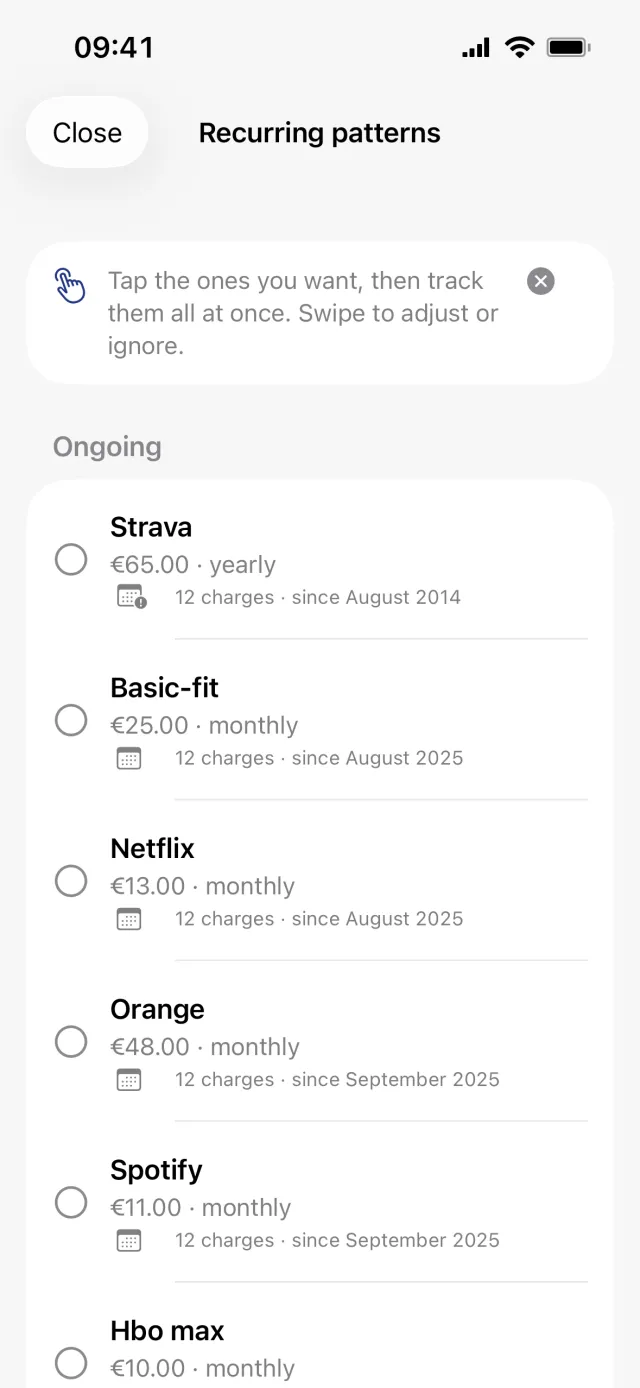
Let Penge find them
- Open Subscriptions.
- Tap the plus in the top right and choose Detect from history. With nothing tracked yet, the empty state offers the same thing as Review all N detected patterns.
- On the Recurring patterns sheet, tap the rows you want. Patterns still being charged sit under Ongoing, ones that have stopped under Earlier.
- Tap Track N subscriptions in the bar at the bottom.
- If matching transactions are still uncategorized, Apply to existing transactions? offers to file them. Tap Apply N, or Not now.
Good to know
- Ticking a row does not track it. Nothing is saved until the button in the bottom bar, and that button only appears once at least one row is ticked.
- The scan runs on Penge's server, so it needs a connection. Without one the app reuses the last scan, or shows Couldn't look for suggestions with a Try Again button.
- Detection reads up to three years of expenses. Income is never offered as a subscription.
- A pattern needs gaps that fit a weekly, monthly or yearly rhythm, amounts that stay close to one another, and at least three separate charge dates, four when the rhythm is weekly.
- Some regular payments are held back on purpose: rent, mortgage, shared costs, municipal fees, electricity, car loans and leasing, student loans, saving, child support and allowance, salary, transfers between your own accounts, and anything in a group you have excluded from statistics. Insurance, internet and TV, memberships, childcare, travel passes and bank fees are still offered.
- A subscription confirmed this way gets no name of its own. The row is titled by the keyword, with the first letter capitalised.
Ignore a pattern, or bring it back
- Swipe a row on the Recurring patterns sheet to the left.
- Tap Ignore to move it out of the way, or Adjust to open it pre-filled so you can change the keyword, the rhythm, the price or the category before saving.
- Ignored patterns collect under Ignored at the bottom of the same sheet. Tap Restore on a row to bring it back.
Good to know
- A full swipe triggers Ignore, not Adjust.
- Ignored patterns are stored on your account, so an ignore survives a reinstall and follows you to a new phone.
- The New subscriptions notification leaves ignored patterns alone, so waving one off silences it there too.
- Adjust tracks nothing on its own. The sheet it opens still has to be saved.
Add one by hand
- On Subscriptions, tap the plus and choose Add manually.
- Under Match keyword, type a word from the payment description, for example netflix.
- In the Billing section, tap Repeats and pick Weekly, Monthly or Yearly.
- Type the price into Expected amount.
- Under Auto-categorize, pick a Category and any Tags. A name of your own goes in the Name section below it, and is optional.
- Tap Save.
Good to know
- Fill in Expected amount. A subscription saved with that field blank never learns a price, however many charges arrive, and never counts towards the monthly cost figure.
- The keyword needs at least three letters or numbers once spaces and punctuation are stripped, and a rhythm is required. Both errors only appear after the first tap on Save.
- Matching ignores capital letters but not accents, so cafe does not match CAFÉ.
- You can also start from a payment: open the transaction, tap Edit, then Mark as subscription. Only the keyword and the currency come across.
- What all of this costs is covered in track what your subscriptions cost.
Get a full overview with Penge
Connect your bank and let the app categorize and budget automatically.
Questions about this
- Why is my rent not offered as a subscription?
- On purpose. Rent, mortgage, shared costs, electricity, loans, saving, salary and transfers between your own accounts are held back, decided from how you have categorized those payments yourself. You can still add one by hand if you want it tracked.
- A payment I already track is missing from the list. Why?
- Patterns already covered by a subscription or by a categorization rule keyword are dropped before the list is drawn, so you are never offered something twice.
- What is the difference between a subscription and a rule?
- Both are a keyword with a category and tags. A subscription adds a rhythm, a price, a set of linked charges, the cost chart and an ongoing or ended status. A rule can be switched off without deleting it; a subscription cannot.
- Does tracking a subscription recategorize my old transactions?
- Only the ones still uncategorized, and only after you confirm them in the Apply to existing transactions? sheet. Anything you have already categorized is left alone.