
Budgets, statistics and subscriptions
Track what your subscriptions cost
The Subscriptions screen carries two cost figures that answer different questions: what you have actually paid, and what the subscriptions still running are expected to cost each month.
What do the two cost figures mean?
Paid per month is a chart of what was actually charged, one stacked bar per calendar month over the last twelve. Monthly cost under it is an estimate: the typical amounts of the subscriptions still running, each turned into a monthly figure. The two will not agree, and neither is wrong.
Read the cost chart
- The chart covers the last twelve calendar months including this one, so a yearly subscription contributes at most one bar.
- Bars are coloured by the subscription's own category, not by the category on each payment. Subscriptions with no category are grouped as Uncategorized in grey.
- Tap a bar to see that month's total and the charges behind it. Long lists end with a line counting the rest.
- Amounts are converted into your primary currency at the rate on each charge's own date.
- A subscription you added a moment ago has no bars until the server has linked its charges.
Read the monthly estimate
- Monthly cost sums only the subscriptions still running. Ended ones are left out of it.
- A weekly price is multiplied out to a month and a yearly price divided by twelve.
- A subscription with no price or no rhythm contributes nothing. If none of them has a usable price, the row does not appear at all.
Which charges count
Charges are matched by keyword and nothing else. Any expense whose description contains the keyword is linked to the subscription, whatever it cost. Expected amount does not filter anything: it feeds the monthly estimate and anchors the price.
- Tap a subscription to open it.
- Scroll to Matching transactions.
- Tap a charge to leave it out. Excluded rows stay in the list, dimmed.
- Tap Show all to reach anything past the first five.
- Tap Save.
Good to know
- Excluded charges stop counting towards the chart, the Total spent figure and the last-charge date.
- Leaving out the newest charge moves the last-charge date backwards, which can push the subscription into Ended.
- Only expenses ever become charges. The server links nothing else, so a reserved row or an incoming payment never counts, however well the keyword fits it.
Price changes and subscriptions that stop
- When a new charge arrives, Penge updates the stored price to the newest one. The app keeps no history of old prices.
- That only works when the subscription already has a price. One saved with Expected amount blank stays blank forever.
- A subscription moves to Ended when no charge has arrived for a whole billing period plus a week of grace: 14 days for weekly, 37 for monthly, 372 for yearly.
- Ended is a guess. Penge never hears from the provider that something was cancelled, and there is no cancel action in the app.
- An ended subscription keeps its bars in the chart and its Total spent figure, and moves back to Ongoing on the next charge.
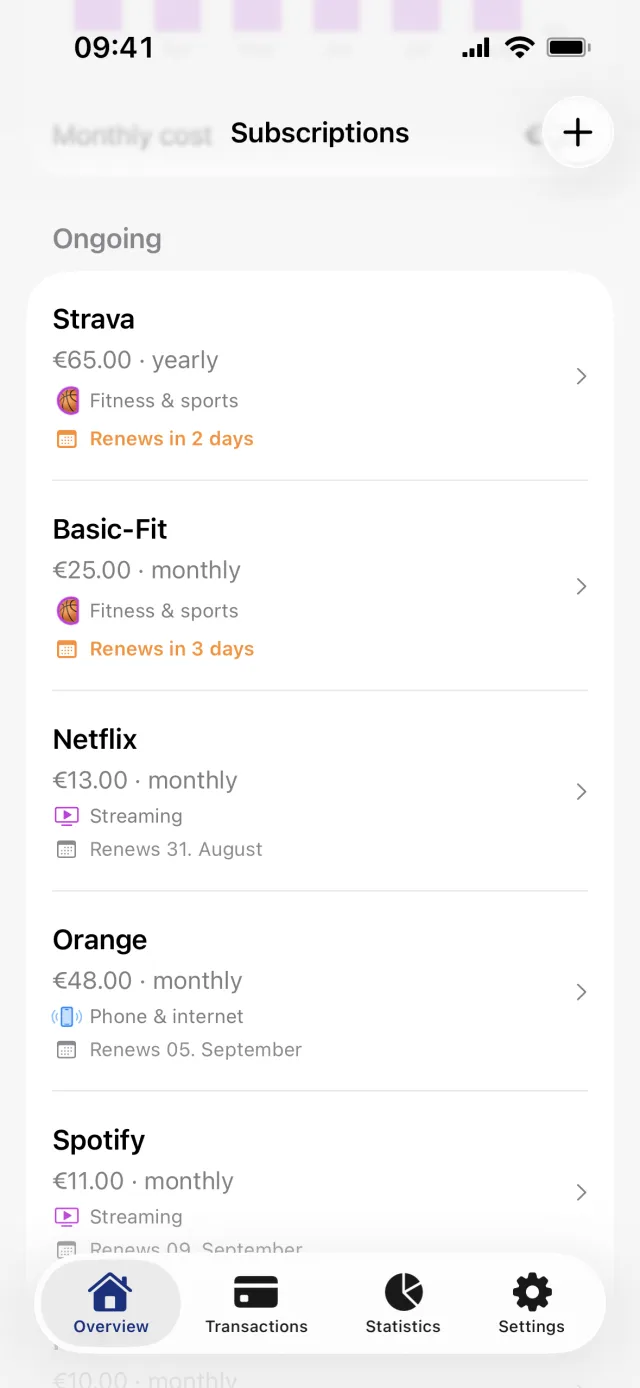
- The renewal line turns orange inside the last three days, where it reads Renews in 3 days, then Renews tomorrow and Renews today.
Good to know
- Three notifications can tell you instead of leaving you to spot it. Price changes fires when a price moves by at least the share you pick, 10% to begin with. Renewal reminders arrives a chosen number of days before the predicted charge, two to begin with. New subscriptions tells you once about a repeating charge you do not track yet.
- All three start off. Turn them on from the Settings tab, under Notifications, in the section headed Subscriptions.
Stop tracking one
A subscription has no on and off switch; only categorization rules have that, and saving a subscription always sets it active again. To stop tracking one, swipe its row to the left and tap Delete. It goes at once, with no confirmation and no undo, and the swipe does nothing at all without a connection.
Getting subscriptions into the list in the first place is covered in find your subscriptions.
Get a full overview with Penge
Connect your bank and let the app categorize and budget automatically.
Questions about this
- Why does the chart not match the monthly cost?
- They measure different things. The chart is what was actually charged in each month, including subscriptions that have since ended. The monthly cost is an estimate for the ones still running, spread evenly across a month. Both are correct.
- My subscription shows no price. Why?
- It was saved with Expected amount blank. A subscription only updates its price when it already has one, so the field stays empty however many charges arrive. Open the subscription, type the amount and save.
- Does Penge tell me before a subscription renews?
- Only if you ask it to. Renewal reminders starts off. Turn it on from the Settings tab, under Notifications, and pick how much notice you want, up to seven days. Without it the only signal is the Renews line on the row, which turns orange within three days of the predicted date.
- Does deleting a subscription delete the payments?
- No. The transactions stay exactly where they are. Deleting releases the charges, so another subscription or rule whose keyword matches can pick them up.